flowchart LR
    A["Labelled data<br/>text + NACE code"] --> B["Split<br/>train / val / test"]
    B --> C["WordPiece Tokenizer<br/>text → token IDs"]
    C --> D["torchTextClassifiers<br/>token IDs → NACE code"]
    D --> E["Evaluation<br/>& explainability"]
Supervised approach using TorchTextClassifiers
1 Forewords
1.1 The problem: classifying free-text activity descriptions
Given a short text description of a business activity — such as “I sell croissants and pains au chocolat” — the objective is to find automatically the correct NACE 2.1 activity code from hundreds of possible codes. This is a supervised multiclass classification problem.
1.2 Supervised learning or RAG?
Two main approaches exist for this task:
| Approach | How it works | Best when |
|---|---|---|
| Supervised (this notebook) | Train a neural network on labelled examples | Large labelled dataset available, low-latency inference needed |
| RAG (see notebook 2) | Retrieve similar examples, ask a LLM to decide | Few labelled examples |
In this notebook, we use the supervised approach: the model learns directly from thousands of labelled examples and can predict at inference time without calling an external API.
1.3 Pipeline overview
1.4 What you will learn
- How to prepare and split a labelled text dataset
- How to train a subword tokenizer (WordPiece) on domain-specific text (tokenizers are introduced in Section 4)
- How to configure and train a neural text classifier end-to-end
- How to load a pretrained model from MLflow and run inference
- How to interpret predictions using the Captum package
1.5 Before you start
Three things need to be in place before running any cell.
1. Install the dependencies
All required packages are listed in pyproject.toml. Run the following command once at the root of the project to install them into a virtual environment:
uv syncThis installs, among others, torchTextClassifiers — the INSEE library that provides the tokenizer, model, and training loop used throughout this notebook. Its full API documentation is available here.
2. Understand what MLflow is and why we need it
In this notebook, we use MLflow in two ways:
- During training (Exercise 4), metrics are logged to a remote MLflow server so you can monitor progress.
- After training (Exercise 4, Question 3), we download a pretrained model that was already trained on the full dataset and stored in MLflow, so you do not have to wait hours for training to complete.
3. Start an MLflow service
Launch an MLflow service from the SSP Cloud service catalogue. To do so, go on SSPCloud, click on My Services, then on New Service, then on Automation, then on MLflow, then on Launch. Once the service starts, its public URL appears in the service details. It typically looks like https://user-<username>-mlflow.user.lab.sspcloud.fr.
4. Set up your MLflow credentials
MLflow is an open-source platform for tracking machine learning experiments. Every time a model is trained, MLflow records the hyperparameters used, the metrics obtained (loss, accuracy…), and the model artefacts (weights, tokenizer, configuration). This makes it easy to compare runs, reproduce results, and share trained models with others. This funathon project uses MLflow in multiple ways.
Because the MLflow server is a remote, access-controlled service, you need to provide three pieces of information:
MLFLOW_TRACKING_URI: the URL of the MLflow server (ex:https://user-<username>-mlflow.user.lab.sspcloud.fr).MLFLOW_TRACKING_USERNAME;MLFLOW_TRACKING_PASSWORD.
They are given on the information panel that opens when you launch your MLflow service.
These values must not be hardcoded in the notebook — storing credentials in source code is a security risk (anyone with these credentials could access your MLflow). Instead, create a file named .env at the root of the project and fill it in as follows:
MLFLOW_TRACKING_URI=<add the MLflow server URL>
MLFLOW_TRACKING_USERNAME=<add your username>
MLFLOW_TRACKING_PASSWORD=<add your password>
The notebook loads this file automatically at startup with load_dotenv(), making the values available as environment variables without ever appearing in the code. Be careful: do not add spaces around the = sign, and do not put single quotes or double quotes. Example: MLFLOW_TRACKING_USERNAME=user-donaldduck.
2 Load the data
The dataset consists of synthetic labelled examples generated for the NACE rev 2.1 nomenclature. Each row contains a short text description (label) and the corresponding NACE code (code).
3 Split the data
Before training a model, we need to split the dataset into three subsets:
- Train: the examples the model learns from.
- Validation: used during training to monitor performance and trigger early stopping (i.e. stop training before overfitting).
- Test: held out until the very end to give an unbiased estimate of the model’s performance on unseen data.
NoteWhy three splits and not two?
Using the validation set to tune hyperparameters or stop training means it indirectly influences the model. The test set must therefore remain completely untouched during training so that the final evaluation is truly unbiased.
4 Applying a tokenizer
4.1 Why tokenization?
Neural networks can only work with numbers because they have no notion of letters or words. As a a consequence, models cannot use directly the string “I sell croissants and pains au chocolat” to predict a NACE code, it must be transformed into something the model can use. A tokenizer is the component that bridges this gap: it converts raw text into a sequence of integers that the model can process.
The process has three steps:
- Split the text into small units called tokens: these can be whole words, subword fragments, or individual characters.
- Map each token to a unique integer using a fixed vocabulary (a lookup table built during training).
- Pad or truncate the resulting sequence to a fixed length so that all inputs have the same shape, which is required for batched training.
The diagram below illustrates this pipeline on a short example:
flowchart LR
    A["#quot;I sell croissants#quot;"] -->|"split into tokens"| B["[#quot;i#quot;, #quot;sell#quot;, #quot;croi#quot;, #quot;##ssants#quot;]"]
    B -->|"look up in vocabulary"| C["[45, 112, 87, 203]"]
    C -->|"pad to length 6"| D["[45, 112, 87, 203, 0, 0]"]
4.2 Why subword tokenization?
There are several ways to split text into tokens: by character, by full word, or by subword fragment. Each has trade-offs:
| Strategy | Example for “croissants” | Problem |
|---|---|---|
| Character-level | ["c","r","o","i","s","s","a","n","t","s"] |
Sequences become very long; meaning is hard to capture |
| Word-level | ["croissants"] |
Rare or misspelled words get mapped to [UNKNOWN] |
| Subword (WordPiece) | ["croi", "##ssants"] |
Handles rare words without losing common subparts |
WordPiece, the algorithm used here, builds a vocabulary of frequent subword units from the training corpus. Words it has never seen can still be represented by combining known fragments. The ## prefix marks a fragment that continues the previous token (i.e. it is not the start of a new word).
Because the vocabulary is learned from your data, it naturally adapts to domain-specific vocabulary; in our case, French business descriptions full of technical terms.
NoteWant to go further?
- The Hugging Face tokenizer documentation gives a clear overview of the main tokenization strategies (BPE, WordPiece, Unigram).
- The Hugging Face tokenizers course chapter is a hands-on introduction for beginners.
5 Model architecture
A text classification model in torchTextClassifiers is built from three components (on top of the ValueEncoder and the tokenizer seen above):
- TextEmbedder: converts token IDs into dense vectors (embeddings) of size
embedding_dim.
NoteEmbeddings, a key concept in NLP models
The problem: computers can’t work with words directly — they need numbers. A naive solution is to assign each word a unique integer (its token ID). But this is useless for learning: the number 2345 tells the model nothing about what “cat” means, and gives no hint that “cat” and “kitten” should be treated similarly.
The idea: instead of a single integer, represent each token as a dense vector — a list of, say, 768 floating-point numbers. This vector is the word’s embedding: its coordinates in a high-dimensional “semantic space”.
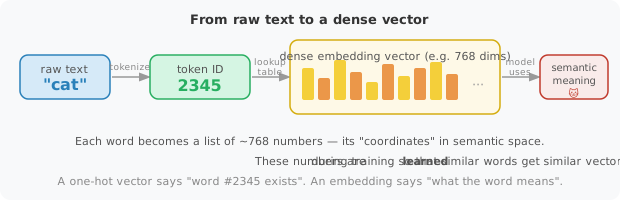
Where do these numbers come from? The embedding vectors are learned parameters of the model, initialised randomly and updated during training just like any other weight. The training signal pushes the model to give similar vectors to words that behave similarly in context. After training, words with related meanings end up close together in embedding space.
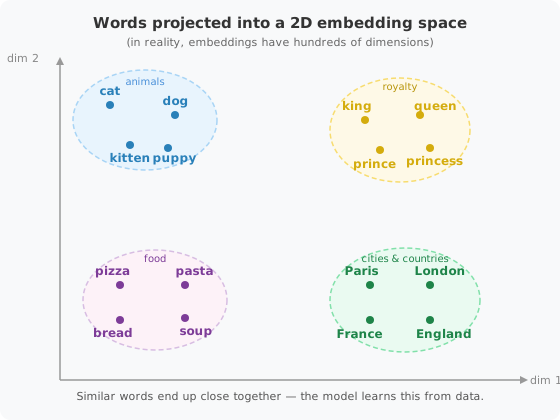
A memorable analogy: think of each word as a point on a map. Cities in the same country end up near each other; animals cluster together; food words form their own neighbourhood. The “distance” between two points reflects how semantically related the words are. This is why you can do things like:
\[\text{vec}(\textit{king}) - \text{vec}(\textit{man}) + \text{vec}(\textit{woman}) \approx \text{vec}(\textit{queen})\]
The geometry of the space encodes meaning.
In torchTextClassifiers: the TextEmbedder component takes a sequence of token IDs and looks up each one in a learnable embedding matrix (of shape vocab_size × embedding_dim), producing a sequence of dense vectors that the rest of the network can reason about.
CategoricalVariableNet (optional): encodes additional categorical features and merges them with the text representation. Not used here.
ClassificationHead: projects the final representation onto
num_classesdimensions. The highest value determines the predicted class.
To learn more about the building blocks of the torchTextClassifiers package, please visit the documentation.
These are configured through ModelConfig and assembled automatically by torchTextClassifiers. You can see some ModelConfig examples here and for torchTextClassifiers here.
6 Training
Training a neural network means finding the weights that minimise a loss function — a measure of how wrong the model’s predictions are. At each step, the model makes predictions on a mini-batch of examples, computes the loss, and updates the weights in the direction that reduces it (via an optimization algorithm called the stochastic gradient descent).
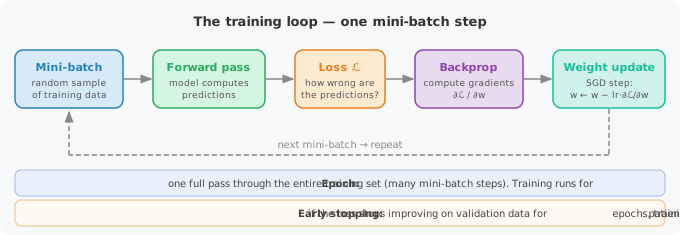
Key training hyperparameters:
num_epochs: how many times the model sees the full training set.batch_size: how many examples are processed at once before a weight update.lr(learning rate): how large each weight update step is.patience_early_stopping: stop training if the validation loss has not improved for this many epochs, to avoid overfitting.
6.1 Question 1 — Create the classifier
Using the torchTextClassifiers package, create a ModelConfig. Then create a torchTextClassifiers classifier that uses this ModelConfig and the trained tokenizer. Set the dimension of embeddings to 96. You will need to read carefully the torchTextClassifiers documentation.
Clue here
Build aModelConfig with embedding_dim and num_classes. Pass both to torchTextClassifiers(tokenizer=..., model_config=..., value_encoder=...).
NoteKey parameter
The hyperparameter embedding_dim controls the size of the dense vector representing each token. Larger values capture more information but are slower to train.
Click to see the answer
from torchTextClassifiers import ModelConfig, TrainingConfig, torchTextClassifiers

embedding_dim = 96

model_config = ModelConfig(
    embedding_dim=embedding_dim,
    num_classes=n_classes,)

ttc = torchTextClassifiers(
    tokenizer=tokenizer,
    model_config=model_config,
    value_encoder=value_encoder,
)
6.2 Question 2 — Prepare training
Create a TrainingConfig(lr=..., batch_size=..., num_epochs=...). Look at the documentation. Do you understand what each argument does? Use only 1 epoch for fast training.
NotePlay with hyperparameters
Of course, you can play with hyperparameters if you want: add more epochs, change the learning rate and the batch size… But remember that you are training the model using CPUs, so avoid big models that will take a lot of time and resources to train.
NoteWant to learn what hyperparameters do?
Key hyperparameters used here:
lr=5e-4: a standard starting learning rate for Adam-based optimizers.batch_size=128: how many examples are processed before each weight update — larger batches are faster but require more memory.num_epochs=1: one pass over the data, kept short for this demo.
Click to see the answer
training_config = TrainingConfig(
    num_epochs=1,
    batch_size=128,
    lr=5 * 1e-4,
    patience_early_stopping=5,
)
6.3 Question 3 — Train on a small subsample
Train the model using the TrainingConfig defined before. Look carefully at the arguments of the train method. You can try to use MLflow or automatic model logging, but this is optional (see below).
Clue here
Callttc.train(X_train=..., y_train=..., X_val=..., y_val=..., training_config=..., verbose=True).
TipTip — Logging training with MLflow
Use mlflow.pytorch.autolog() and wrap your training call in mlflow.start_run() to automatically log metrics (loss, accuracy) to an MLflow experiment:
mlflow.set_experiment("my-experiment")
mlflow.pytorch.autolog()

with mlflow.start_run():
ttc.train(...)mlflow.set_experiment(...): sets the active experiment (created automatically if it does not exist).- Each call inside
mlflow.start_run()creates a new run inside that experiment, so successive training attempts are kept separate and comparable. - If
MLFLOW_TRACKING_URIis set in your environment (e.g. via.env), metrics are forwarded to that remote server automatically.
Click to see the answer
mlflow.set_experiment("funathon-2026-project2")
mlflow.pytorch.autolog()

with mlflow.start_run() as run:
    # This should take approximately 1-2mn
    ttc.train(
        X_train,
        y_train,
        training_config=training_config,
        X_val=X_val,
        y_val=y_val,
        verbose=True,
    )

    mlflow.log_artifacts(
        training_config.save_path,   # local folder produced by ttc.train()
        artifact_path="model_artifacts",
    )
TipTip - Loading the model back from MLflow
torchTextClassifiers.load() reads model_checkpoint.ckpt, tokenizer.pkl, value_encoder.pkl, and the metadata file that were saved by ttc.save() — the same files that ttc.train() produced.
#| label: load-from-run
#| code-overflow: scroll
#| output: true
local_dir = mlflow.artifacts.download_artifacts(
    f"runs:/{run.info.run_id}/model_artifacts"
)

# Rebuild the torchTextClassifiers object from the downloaded files
ttc_loaded = torchTextClassifiers.load(local_dir)

print(ttc_loaded)
7 Prediction and explainability
Once the model is trained, we can use it to predict NACE codes for new text descriptions. Beyond a simple prediction, we also want to understand why a given NACE code was predicted — specifically, which words in the input text contributed the most to the decision. To understand which words influenced a prediction, we use a technique called integrated gradients (via Captum’s LayerIntegratedGradients). It assigns a score to each word in the input: a high score means that word pushed the model toward the predicted class. You can refer to this tutorial on explainability for more details.
ImportantOn the interpretation of integrated gradients
Scores based on integrated gradients are a useful guide, not a definitive explanation. Treat them as a way to explore the model’s behavior, not as proof of causality.
7.5 Conclusion
Not bad at all! The model reaches strong accuracy on the held-out test set — a genuinely production-ready1 classifier for NACE 2.1 codes.
1 Really? For production purposes, accuracy is not enough: calibration and robustness metrics matter too. Check out this presentation to read more about the metrics to be checked before trusting a model for production.
In this notebook we learnt how to:
- Load and explore a labelled dataset of business activity descriptions mapped to NACE codes.
- Preprocess the data: split into train, validation, and test sets, and encode the string labels to integers with
LabelEncoder. - Use the
torchTextClassifierspackage to handle the full workflow: encoding textual labels, training a tokenizer, building a classifier, and explaining its predictions. - Train a WordPiece tokenizer from scratch on the training corpus, adapting the subword vocabulary to French domain-specific text.
- Configure and train a neural text classifier end-to-end using
torchTextClassifiers, with MLflow tracking metrics in real time. - Load a pretrained model from MLflow artefact storage, so the full-dataset model is available without waiting hours for training.
- Interpret predictions using Captum’s Integrated Gradients to visualise which words drove each classification decision.
- Evaluate accuracy on the unseen test set.
Ready to go further? Head over to the next notebook — Introduction to RAG — where we tackle the same classification problem from a completely different angle: retrieval-augmented generation.